Running Emacs in microVM
smolBSD makes it easy to spin up tiny, fast-booting NetBSD VMs.
Recently, I needed to test a full build of my C networking library together with the C build toolchain under NetBSD. Everything is fine on GNU/Linux (Ubuntu) and macOS—I just want to confirm it works on NetBSD as well.
Why NetBSD? NetBSD is an open-source Unix-like operating system famous for its outstanding portability. It runs on an exceptionally wide range of hardware—from modern x86-64/aarch64 servers and desktops to embedded systems, handheld devices, vintage machines (such as VAX and m68k), and even some game consoles (see Platforms supported by NetBSD). Its long-standing motto is “Of course it runs NetBSD”. This makes sense if you want maximum portability.
After all, it’s essentially good old 4.3BSD, which adds a nice touch of nostalgia.
My home data center, as I call it, does not have a dedicated NetBSD machine so I settled on using a virtual machine, or rather, the smolBSD microVM, a minimal NetBSD-based BSD UNIX virtual machine that boots and starts a service in a few milliseconds.
My requirements
My requirements to the microVM are simple.
- I need to login to the interactive shell (
kshin NetBSD, by default). - I need the compiler toolchain and related development files
(headers, libraries, build tools such as
gcc,make,ld, etc.) because I will compile software inside the microVM. - And, of course, I need Emacs for editing, navigating directories, compiling source code, debugging, and many other things that any developer needs.
(Yes, NetBSD comes with vi—not vim!—version 1.81.6-2013-11-20nb4 pre-installed, but… but I just need Emacs.)
Creating the NetBSD microVM from Ubuntu
Installing smolBSD
A detailed description of the smolBSD installation process on Debian-based and macOS systems can be found on the smolBSD GitHub page.
Building a raw microVM image (.img)
To build a raw NetBSD image we will use SMOLerfile, smolBSD’s
configuration file for defining a minimal NetBSD-based microVM
service. It supports the well-known Dockerfile verbs—like FROM,
RUN, CMD etc.—but does not implement the full Dockerfile
reference. This is sufficient for our purposes.
My Dockerfile.devsh SMOLerfile that installs and configures Emacs is shown
below. I put it in the $NETBSD_ROOT/smolerfiles directory on the host;
the NETBSD_ROOT envvar points to the smolBSD installation directory on the host.
# ----------------------------------------------------------
# NetBSD development shell with Emacs included.
# Time-stamp: <Last changed 2026-09-19 16:59:22 by magnolia>
# ----------------------------------------------------------

# Disable: unusual "FROM" naming, multiple RUN don't matter, and non-JSON CMD
# hadolint global ignore=DL3006,DL3025,DL3059

# `base' -- The core system. Contains the essential binaries, shared libraries,
# and utilities required for a minimally functional NetBSD system.
# This set is mandatory.

# `etc' -- System configuration files (primarily under /etc and a few other places).
# Needed for a complete install from scratch;
# provides the default configuration skeleton.

# `comp' -- Compiler/toolchain set. Includes compilers (C/C++),
# header files (/usr/include), static libraries, linker, make,
# and related development tools.

FROM base,etc,comp

# Mandatory -- a name of the service
LABEL smolbsd.service="devsh"

# Shrink the final image to only needed content + extra NNN MB
LABEL smolbsd.minimize=+512
# Extra packages
LABEL smolbsd.addpkgs="pkgin pkg_tarup pkg_install sqlite3 rsync curl"
# Microvm will use a `pty' as console
LABEL smolbsd.use_pty="y"
# 2G disk initially; it will be truncated to minimum + extra NNN MB
LABEL smolbsd.imgsize=2048

ARG HOSTNAME=bsd
ARG USERSHELL=/bin/ksh
ENV USERNAME=magnolia

# Note: INCLUDE is SMOLerfile extension!
# For interactive shell; provided by smolBSD distribution.
INCLUDE smolerfiles/usershell.inc

# ====================================
#               EMACS
# ====================================

# Create ~/.emacs with minimal tuning.
RUN <<EOF
cat > ${HOMEDIR}/.emacs << 'EMACS'
;;; Minimal Emacs config for NetBSD
;; Basic settings
(setq
  column-number-mode t
  ring-bell-function 'ignore
  scroll-step 1
  scroll-conservatively 100000
  scroll-preserve-screen-position 1
  scroll-margin 0
  mouse-wheel-scroll-amount '(1)
  mouse-wheel-progressive-speed nil
  global-visual-line-mode nil
  show-paren-mode t
  tab-always-indent 'indent
  tab-width 4
  tool-bar-mode nil
  truncate-lines nil
  word-wrap t
  make-backup-files nil
  auto-save-default nil
)

;; No line numbers (can be toggled by "C-c l")
(global-display-line-numbers-mode -1)

(setq-default indent-tabs-mode nil)
(global-hl-line-mode 1)
(delete-selection-mode t)
(desktop-save-mode 1)
(savehist-mode 1)

;; No menu
(menu-bar-mode -1)

;; Killing the current Dired buffer upon navigating into a different directory.
(setq dired-kill-when-opening-new-dired-buffer t)

;; Basic C settings
(setq c-default-style "stroustrup")
(setq c-basic-indent 4)
(setq c-basic-offset 4)
(c-set-offset 'innamespace 0)
(c-set-offset 'inextern-lang 0)

;; Some useful keybindings
(define-key global-map (kbd "RET") #'newline-and-indent)
(global-set-key (kbd "M-o") #'other-window)
(global-set-key (kbd "M-a") #'beginning-of-line) ; QEMU intercepts "C-a"
(global-set-key (kbd "M-e") #'end-of-line) ; For consistency
(global-set-key (kbd "C-c l") #'display-line-numbers-mode)
EMACS
chown ${USERNAME} ${HOMEDIR}/.emacs
chmod 600 ${HOMEDIR}/.emacs
EOF

# To use Emacs keys in the shell
RUN echo 'set -o emacs' > /etc/shrc

RUN echo 'alias ll="ls -la"' >> /etc/shrc

# Install Emacs
RUN pkgin up && pkgin -y in emacs-nox11

# Install GNU make; we will use it instead of default `bsdmake'
RUN pkgin -y in gmake

# Login to `ksh', the default shell on NetBSD
CMD login -f -p $USERNAME
As you can see, I added a new key binding—M-a for beginning-of-line.
The point is that QEMU—an open-source machine emulator
and virtualizer available on essentially all major desktop and server
operating systems (Linux, macOS, Windows, BSDs) and the most common
CPU architectures—uses Ctrl-A as its special escape key for the
character-backend multiplexer. That is why pressing Ctrl-A aborts or
interferes with the VM instead of being passed to Emacs.
A quick workaround is to send a real C-a to Emacs by pressing Ctrl-A
twice (Ctrl-A Ctrl-A)—the first Ctrl-A is eaten by QEMU;
the second one is delivered to the guest.
My muscle memory resists using double-pressing C-a so I added M-a,
although it’s not that easy to remember either. M-e is added for consistency.
To simplify the build process, I’ve created a simple script:
#!/bin/bash

# `smolbsd-build.sh SERVICE'
# ==========================

# NETBSD_ROOT envvar should point to the smolBSD directory on the host.
if [ -z "$NETBSD_ROOT" ]; then
    echo "Error: NETBSD_ROOT envvar not defined."
    exit 2
fi

if [ -z "$1" ]; then
    echo "Usage: smolbsd-build.sh SERVICE"
    exit 1
fi

pushd .
IMAGE="smolerfiles/Dockerfile.$1"
cd $NETBSD_ROOT
echo "Building $IMAGE ..."
./smoler.sh build $IMAGE
popd
Running Emacs in the NetBSD microVM
Here is my script to run the NetBSD microVM:
#!/bin/bash

# `smolbsd-run.sh SERVICE'
# ========================

# NETBSD_ROOT envvar should point to the smolBSD directory on the host.
if [ -z "$NETBSD_ROOT" ]; then
    echo "Error: NETBSD_ROOT envvar not defined."
    exit 2
fi

if [ -z "$1" ]; then
    echo "Usage: smolbsd-run.sh SERVICE"
    exit 1
fi

pushd .
cd $NETBSD_ROOT
# 1) -f CONFIG      VM configuration file; it's created automatically during the build stage.
# 2) -P             use PTY terminal
# 3) -n 2           enable stopping VM from ksh (as `su'): . /etc/include/shutdown
# 4) -w PATH        mount host's PATH to guest's /mnt/
./startnb.sh -f "etc/$1.conf" -P -n 2 -w ${HOME}/workspace/devel
popd
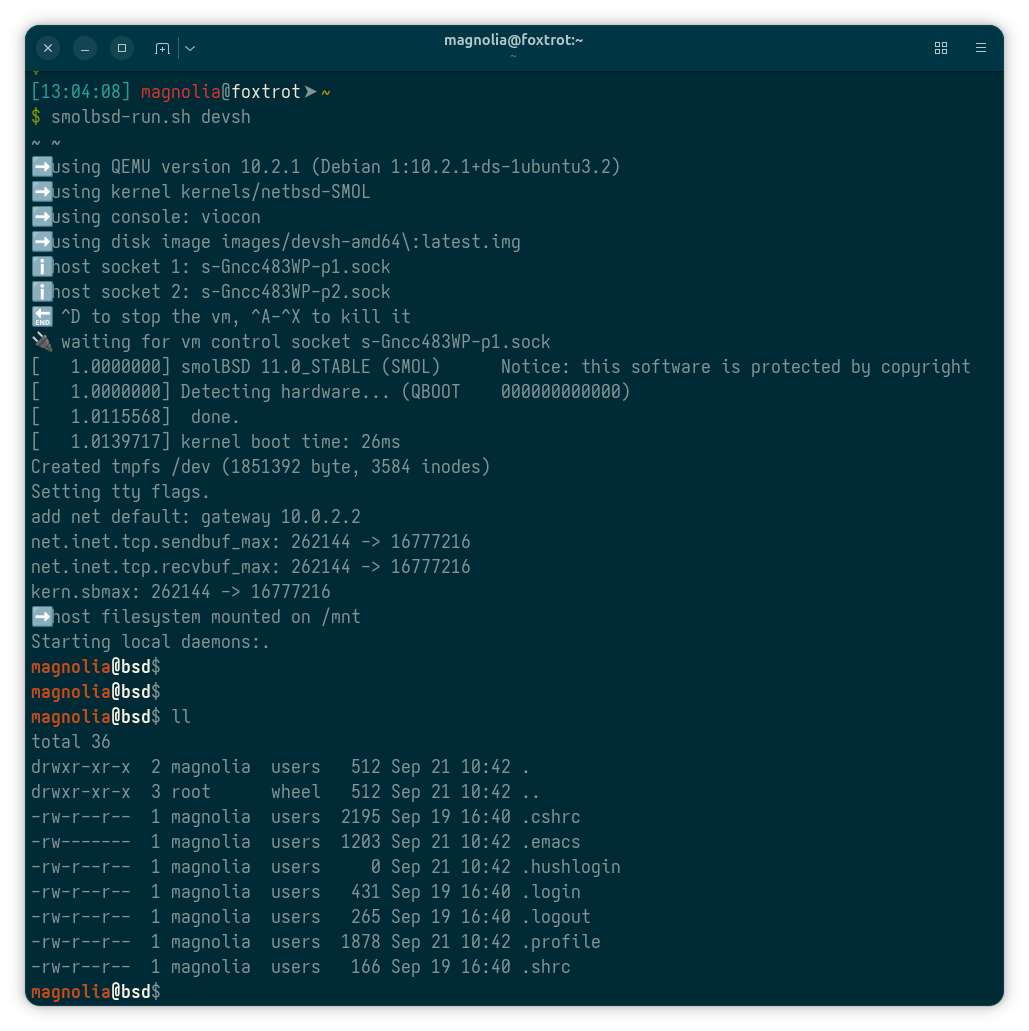
Now we can run the devsh microVM (bsd) on the host (foxtrot):
Click or tap to view the full-size picture.
As you can see, the NetBSD kernel starts in 26 ms on my old Dell Latitude 7400 laptop. The entire VM initially occupies 180 MB of host memory. Not a bad result.
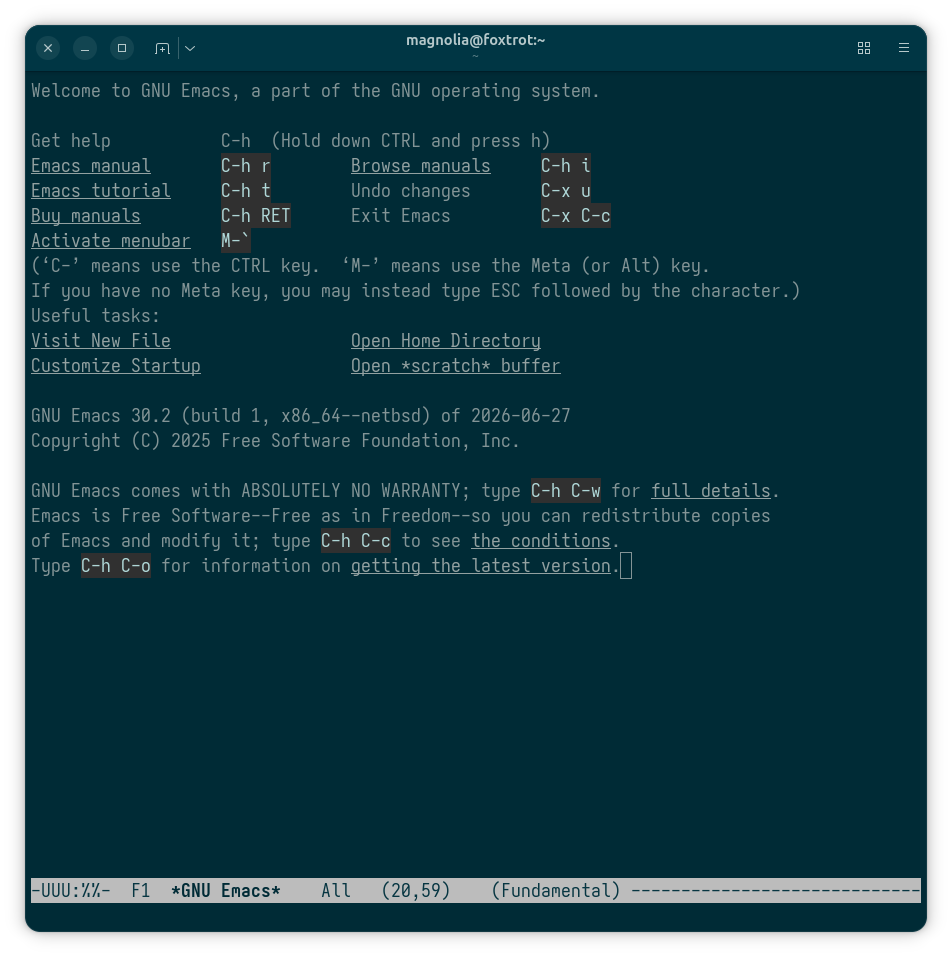
And then we can run Emacs:
Click or tap to view the full-size picture.
Happy emacsing in VM!
— The Emacs Cat.